Step-by-step guide: how to assemble a bot that accepts voice messages, converts them into tasks, maintains a purchase spreadsheet, reminds about measurements, analyzes channels before purchasing, and drafts ad posts.
This guide is designed for someone who has never set up a bot before. All commands are copied in full. If a step fails, each section ends with verification and analysis of typical errors.
Prerequisites:
- Telegram account
- Any VPS running Ubuntu 22.04 or newer (the cheapest plan with 1 core and 1 GB RAM is sufficient)
- Google account (for the spreadsheet)
- Approximately 40 minutes of time
Monthly costs: Server — from $4; Telegram — free; Google Sheets — free; voice recognition and task parsing — less than $1 at normal load.
Important note about server selection. Some hosting providers (especially shared hosting for websites) block outgoing connections to api.telegram.org. The bot will not work on such a server, and it’s difficult to detect — it simply remains silent. A one-command check is included in step 3.
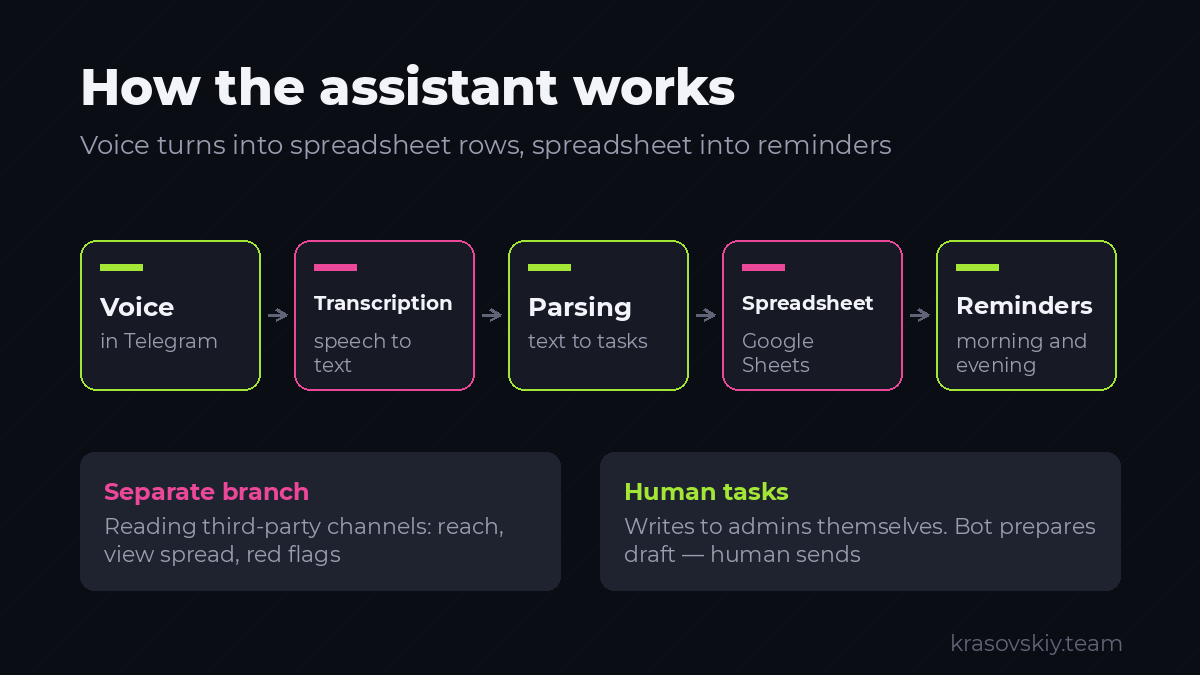
Part 1. The Process We Automate
The bot is useless if it’s unclear which workflow it supports. Below is a brief version of the purchasing process. The full version with all message templates, formulas, and security rules is available in a separate document, “Regulations: Purchasing Ads in Telegram Channels,” which must be read before starting.
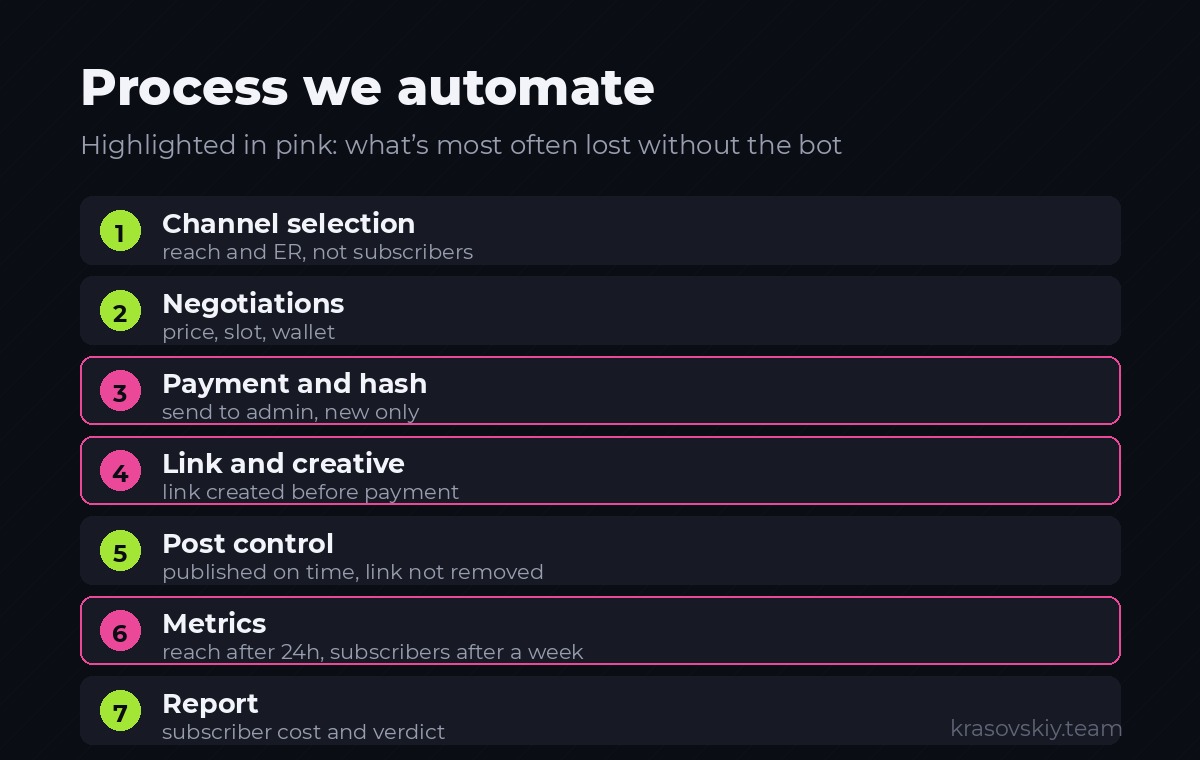
Purchasing consists of seven stages:
- Channel selection. We look not at the number of subscribers but at the average post reach and engagement. We filter out fake engagement.
- Negotiations. We message the admin: product, format, request for price, available dates, and wallet.
- Payment. We pay, record the transaction hash, and send the hash to the admin in Telegram. Only new hashes — never reuse them.
- Creative and link. We create a unique invite link before payment, prepare the post, and send it to the admin.
- Publication control. We check at the agreed time, retrieve the post link, and ensure the link in the text isn’t removed.
- Measurements. After 24 hours — reach. After 7 days — how many people joined via the unique link.
- Report. We calculate the cost per subscriber and make a decision: repeat, negotiate, or blacklist.
Three points here fail most often, and the bot addresses them:
- Forgetting to create a unique link before placement — no way to track conversions;
- Failing to take measurements on time — data mixes with other sources and cannot be restored;
- Losing track of which hashes have already been sent to admins.
The bot handles memory and calculations. Decision-making and communication with people remain human tasks.
Part 2. Preparation
Step 1. Create the Bot
Open Telegram, search for @BotFather — Telegram’s official bot for creating bots. The real BotFather has a verification checkmark; fakes do not.
- Click “Start.”
- Send the command
/newbot. - BotFather will ask for the bot’s name — this is what appears in the chat header. Example:
Ad Purchasing Assistant. - Then it will ask for a username — it must end with
botand be available. Example:zakupka_assist_bot. - In response, you’ll receive a token like
8123456789:AAF...— a long string.
The token is the bot’s password. Whoever has it controls the bot. Do not share it in public chats or commit it to a repository. If accidentally exposed, use /revoke in BotFather to generate a new one.
Immediately configure privacy to avoid collecting unnecessary data:
/setprivacy→ select the bot →Enable/setdescription→ short description/setcommands→ send as a block:
start - запустить
help - что умею
task - добавить задачу текстом
today - задачи на сегодня
channel - анализ канала перед закупкой
draft - черновик рекламного поста
Step 2. Find Your Telegram ID
The bot should respond only to its users. For this, you need the numeric ID of each team member.
Search for the bot @userinfobot, start it, and it will send your ID — a number like 123456789.
Collect the IDs of everyone who will use the assistant. The bot will reject all others.
Step 3. Prepare the Server
Connect to the server via SSH:
ssh root@АДРЕС_СЕРВЕРАFirst, verify that the server can reach Telegram:
curl -s -o /dev/null -w "%{http_code}n" https://api.telegram.orgShould output 200. If the command hangs or returns 000, this server is unsuitable — Telegram is blocked from it. Change hosting; proceeding further is pointless.
Create a dedicated user — running the bot as root is incorrect:
adduser --disabled-password --gecos "" assistant
apt update && apt install -y python3-venv python3-pip ffmpeg
su - assistant
Prepare the project folder and virtual environment:
mkdir -p ~/tg-assistant && cd ~/tg-assistant
python3 -m venv venv
source venv/bin/activate
pip install --upgrade pip
pip install aiogram==3.15.0 requests gspread google-auth apscheduler telethon python-dotenv
Step verification: The command python -c "import aiogram, gspread, telethon; print('ok')" should output ok.
Step 4. Obtaining API Keys
The assistant requires two capabilities: speech recognition and intent understanding. Mistral handles intent understanding, while speech recognition is optional—detailed comparison with benchmarks is provided in Step 8.
Mistral API Key (always required):
- Open
console.mistral.aiand register. - Navigate to API Keys → Create new key.
- Copy the key. It is displayed only once.
OpenAI API Key (recommended for speech recognition):
- Open
platform.openai.com, go to API keys → Create new secret key. - Copy the key and top up your balance with the minimum amount.
Speech recognition costs about half a cent per minute of audio. With twenty voice messages per day, this amounts to less than a dollar per month. The reasoning behind this recommendation is explained in Step 8, where benchmarks on the same file are provided.
If you prefer not to pay for a second service, the assistant can function with just the Mistral key, and there is also a completely free option without external services. Both alternatives are described in the same step.
Step 5. Preparing the Spreadsheet
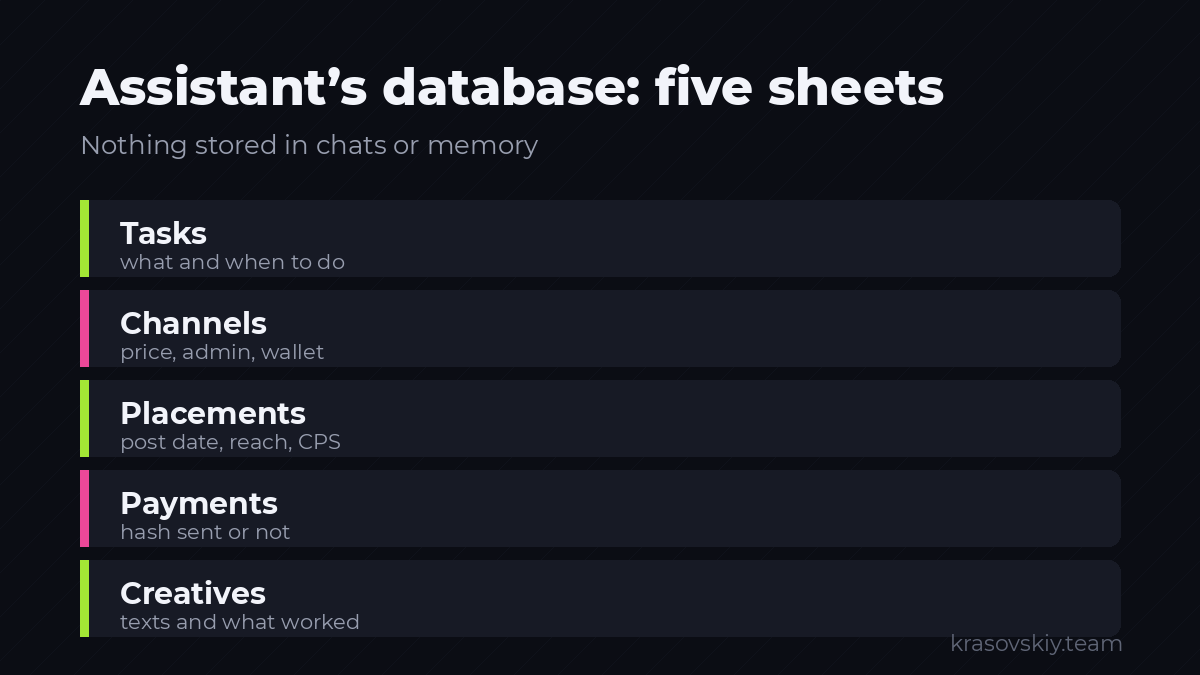
The spreadsheet serves as the assistant’s database. Its structure mirrors the workflow.
Create a Google Sheets document named Закупка Telegram with five sheets. Sheet names must match exactly:
Sheet Задачи — first row:
Дата создания | Задача | Тип | Канал | Срок | Приоритет | Статус | ЗаметкаSheet Каналы:
Название | Ссылка | Тематика | Подписчиков | Средний охват | ER % | Админ | Кошелёк | Прайс | Статус | Последний контакт | ЗаметкиSheet Размещения:
ID | Канал | Дата брони | Дата выхода | Формат | Цена | Валюта | Кошелёк | Хеш | Хеш отправлен | Креатив | Инвайт-ссылка | Ссылка на пост | Статус | Охват 24ч | Подписчиков 7д | CPM | CPS | ВердиктSheet Платежи:
Дата | Сумма | Валюта | Кошелёк | Хеш | Канал | Хеш отправленSheet Креативы:
ID | Текст | Медиа | Где использовался | Лучший CPS | ЗаметкиNow, grant the bot access to this spreadsheet.
- Open
console.cloud.google.comand create a project (name is arbitrary). - In the top search bar, enter
Google Sheets API→ Enable. Repeat forGoogle Drive API. - On the left, navigate to IAM & Admin → Service Accounts → Create Service Account. Enter any name, skip roles, and click Done.
- Open the created account → Keys tab → Add Key → Create Key → select JSON. The file will download automatically.
- Open the downloaded file and locate the
"client_email"line—it contains an address like[email protected]. - Return to the spreadsheet, click Share, and add this address as an Editor.
A step everyone forgets. If you skip granting the service account access to the spreadsheet (Step 6), the bot will crash with a SpreadsheetNotFound error, even if the spreadsheet exists. The service account is a separate “user” and does not automatically see your files.
Upload the key file to the server. Run this command on your local machine, not the server:
scp ~/Downloads/имя-файла-ключа.json assistant@АДРЕС_СЕРВЕРА:~/tg-assistant/google.jsonPart 3. Assembly
All files are created in the ~/tg-assistant directory.
Step 6. Configuration
Create the .env file:
nano ~/tg-assistant/.envContent (replace with your values):
BOT_TOKEN=8123456789:AAF...
MISTRAL_KEY=...
ALLOWED_IDS=123456789,987654321
SHEET_NAME=Закупка Telegram
GOOGLE_CREDS=/home/assistant/tg-assistant/google.json
CHANNEL_ID=@moy_kanal
TG_API_ID=
TG_API_HASH=
Save in nano: Ctrl+O, Enter, Ctrl+X.
Restrict access to the file:
chmod 600 ~/tg-assistant/.env ~/tg-assistant/google.jsonFile config.py:
import os
from dotenv import load_dotenv

load_dotenv()

BOT_TOKEN = os.environ["BOT_TOKEN"]
MISTRAL_KEY = os.environ["MISTRAL_KEY"]
ALLOWED_IDS = {int(x) for x in os.environ["ALLOWED_IDS"].split(",") if x.strip()}
SHEET_NAME = os.environ["SHEET_NAME"]
GOOGLE_CREDS = os.environ["GOOGLE_CREDS"]
CHANNEL_ID = os.getenv("CHANNEL_ID", "")
TG_API_ID = os.getenv("TG_API_ID", "")
TG_API_HASH = os.getenv("TG_API_HASH", "")

MISTRAL_URL = "https://api.mistral.ai/v1"
MODEL_TEXT = "mistral-large-latest"
MODEL_STT = "voxtral-mini-latest"
Step 7. Bot Skeleton
File bot.py:
import asyncio
import logging

from aiogram import Bot, Dispatcher, F
from aiogram.filters import Command
from aiogram.types import Message

import config

logging.basicConfig(level=logging.INFO,
                    format="%(asctime)s %(levelname)s %(message)s")

bot = Bot(token=config.BOT_TOKEN)
dp = Dispatcher()


def allowed(message: Message) -> bool:
    return message.from_user.id in config.ALLOWED_IDS


@dp.message(Command("start"))
async def cmd_start(message: Message):
    if not allowed(message):
        await message.answer("Нет доступа. Обратитесь к администратору.")
        return
    await message.answer(
        "Ассистент закупки на связи.nn"
        "Надиктуйте голосовое — разберу на задачи.n"
        "/today — задачи на сегодняn"
        "/channel ссылка — анализ каналаn"
        "/draft — черновик рекламного поста"
    )


async def main():
    await dp.start_polling(bot)


if __name__ == "__main__":
    asyncio.run(main())
Run the bot:
cd ~/tg-assistant && source venv/bin/activate && python bot.pyStep verification: Find your bot in Telegram by username and click Start. A greeting should appear. The server console will display log entries.
To stop the bot, press Ctrl+C.
If there’s no response:
Unauthorizedin the console — incorrect token; double-check.env;- The bot is silent and logs are empty — the server cannot reach Telegram; revisit the checks from Step 3;
- The bot replies “No access” — your ID is not included in
ALLOWED_IDS.
Step 8. Voice Message to Text
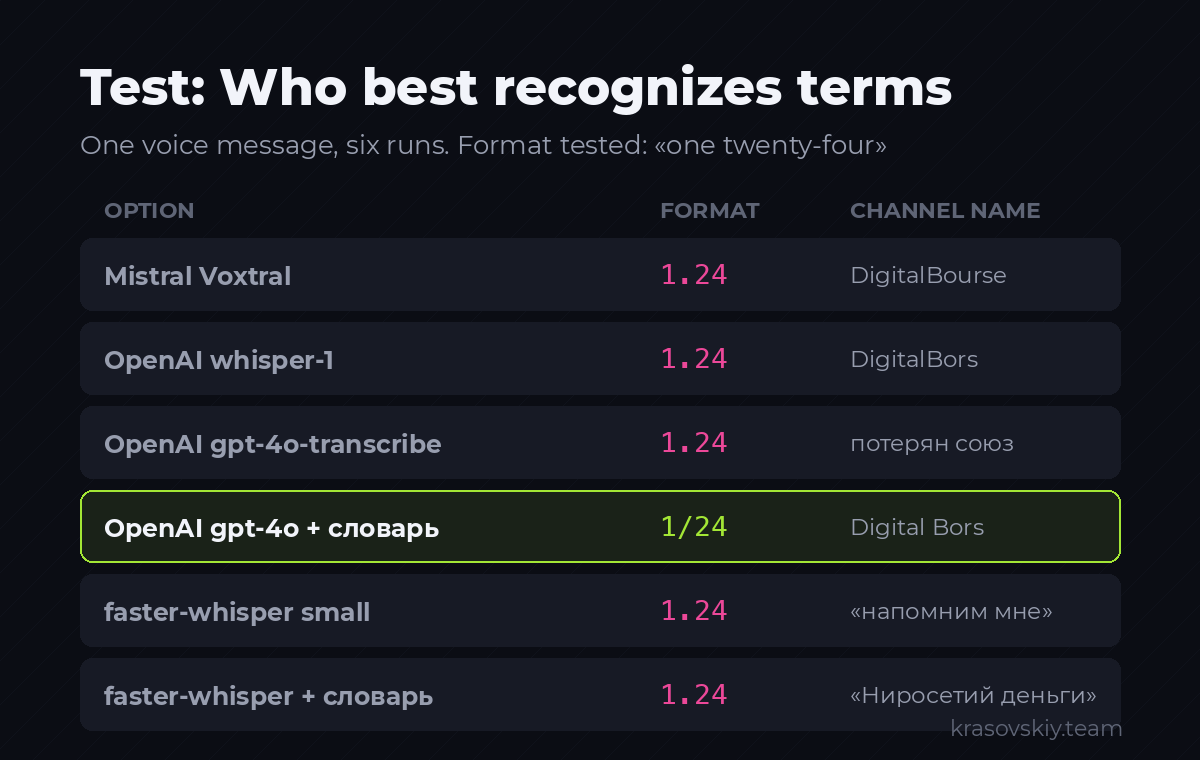
Choosing the right service here is easy to get wrong, so below are measurements, not opinions. The same voice message—three instructions, two channel names in Latin, and the spoken format “one twenty-four”—was processed through four options.
| Option | Result on Problematic Spots |
|---|---|
| Mistral Voxtral | 1.24, DigitalBourse, Telegram Pro IT |
| OpenAI whisper-1 | 1.24, DigitalBors, Telegram про айти |
| OpenAI gpt-4o-transcribe | 1.24, missing conjunction: «нейросети деньги» |
| OpenAI gpt-4o-transcribe with dictionary | 1/24, Digital Bors, Telegram Pro IT, «две тысячи рублей» |
faster-whisper small locally | 1.24, «напомним мне» instead of «напомни мне», «канал о нейросети», Digital Bores |
faster-whisper small with dictionary | 1.24, «Ниросетий деньги» — dictionary made it worse |
The conclusion is not that one model is smarter than another—they are close in speech intelligibility. The difference lies in one thing: OpenAI allows passing a dictionary of terms before recognition, and this is the only thing that corrected 1/24. Verified separately: Mistral silently accepts such a hint and ignores it—three runs, with and without the hint, produced character-by-character identical text.
Why this matters in ad buying: 1.24 instead of 1/24 is a placement format, i.e., what you pay for. The error propagates further into the task, correspondence with the admin, and the report.
We support three options, switched with a single line in .env:
openai— recommended. Best quality for terms, about half a cent per minute of speech.mistral— one key for the entire project, cheaper. Terms are fixed later, via rule 6 in the parsing prompt, so the option is fully functional.local— free, no external services, speech stays on your server. Use this if voice messages contain amounts, wallets, and agreements that cannot be shared externally.
Honest take on the free option. In the measurements above, it was tested on the small model—the one that runs on a cheap server. It clearly confuses endings and verbs: «напомним мне» instead of «напомни мне». For tasks where meaning matters more than exact wording, this is sufficient—parsing in step 9 will still extract what’s needed. However, the term dictionary doesn’t help and sometimes harms: with the hint, the channel name became «Ниросетий деньги» instead of «нейросети и деньги». The large-v3 model is significantly more accurate but requires about 3 GB of disk space and a server with at least 4 GB of memory—no measurements here, test it on your voice messages before putting it into production.
Add to .env:
STT_PROVIDER=openai
OPENAI_KEY=sk-...
And to config.py:
STT_PROVIDER = os.getenv("STT_PROVIDER", "mistral")
OPENAI_KEY = os.getenv("OPENAI_KEY", "")
MODEL_STT_OPENAI = "gpt-4o-transcribe"
MODEL_STT_LOCAL = "large-v3"
File stt.py:
import tempfile

import requests

import config

# Словарь терминов. Распознавание опирается на него в спорных местах.
# Дополняйте своими: названия ваших каналов, продуктов, имена админов.
HINT = (
    "Термины закупки рекламы в Telegram: формат 1/24, формат 2/48, посев, "
    "охват, инвайт-ссылка, CPM, CPS, хеш транзакции, слот, закреп, "
    "оплата в USDT, чёрный список."
)

_local_model = None


def _openai(audio: bytes, filename: str) -> str:
    response = requests.post(
        "https://api.openai.com/v1/audio/transcriptions",
        headers={"Authorization": f"Bearer {config.OPENAI_KEY}"},
        files={"file": (filename, audio, "audio/ogg")},
        data={"model": config.MODEL_STT_OPENAI, "prompt": HINT},
        timeout=180,
    )
    response.raise_for_status()
    return response.json().get("text", "").strip()


def _mistral(audio: bytes, filename: str) -> str:
    response = requests.post(
        f"{config.MISTRAL_URL}/audio/transcriptions",
        headers={"Authorization": f"Bearer {config.MISTRAL_KEY}"},
        files={"file": (filename, audio, "audio/ogg")},
        data={"model": config.MODEL_STT},
        timeout=180,
    )
    response.raise_for_status()
    return response.json().get("text", "").strip()


def _local(audio: bytes, filename: str) -> str:
    global _local_model
    from faster_whisper import WhisperModel

    if _local_model is None:
        _local_model = WhisperModel(config.MODEL_STT_LOCAL,
                                    device="cpu", compute_type="int8")

    with tempfile.NamedTemporaryFile(suffix=".ogg") as handle:
        handle.write(audio)
        handle.flush()
        segments, _ = _local_model.transcribe(handle.name, language="ru",
                                              initial_prompt=HINT)
        return " ".join(segment.text.strip() for segment in segments).strip()


def transcribe(audio: bytes, filename: str = "voice.ogg") -> str:
    """Голосовое Telegram (ogg/opus) в текст. Конвертация не нужна."""
    if config.STT_PROVIDER == "openai":
        return _openai(audio, filename)
    if config.STT_PROVIDER == "local":
        return _local(audio, filename)
    return _mistral(audio, filename)
For the local option, install the library—it’s an open project, the model downloads automatically on first launch:
pip install faster-whisperThe first launch will take a while: the large-v3 model weighs about three gigabytes and downloads once. If the server is weak, change MODEL_STT_LOCAL to medium or small—lower quality but works on a gigabyte of memory.
No need to convert voice messages separately in any of the options—the Telegram format is accepted as-is.
Add a handler to bot.py. Imports go at the top of the file, the handler before the main function:
import stt

@dp.message(F.voice)
async def on_voice(message: Message):
    if not allowed(message):
        return
    note = await message.answer("Слушаю...")
    file = await bot.get_file(message.voice.file_id)
    buffer = await bot.download_file(file.file_path)
    text = stt.transcribe(buffer.read())
    await note.edit_text(f"Расшифровка:nn{text}")
Step verification: Restart the bot, send a voice message. After a few seconds, the text arrives.
A feature to be aware of. Any recognition system writes Latin channel names in its own way: DigitalBourse, DigitalBors, Digital Bors—these are three variants of the same channel from the measurements above. Correcting this in the prompt is pointless; the model doesn’t know the right way. Therefore, the parsing rules include a direct ban: «transcribe as-is, do not correct.» Let the task contain a recognizable distortion rather than a confidently invented wrong name.
With a dictionary (the openai option), ad buying terms are recognized correctly. In the mistral and local options, formats like 1.24 are cleaned up in the next step—via rule 6 in the parsing prompt. That’s why step 9 is necessary in any case.
Step 9. Parsing Text into Tasks
This is the core node of the assistant. The prompt below is operational and has been tested on live voice messages, including the described distortions.
File prompts.py:
import datetime

DAYS = ["понедельник", "вторник", "среда", "четверг",
        "пятница", "суббота", "воскресенье"]


def date_table(today: datetime.date) -> str:
    """Готовый календарь для модели. Считать даты сама она не должна."""
    lines = [
        f"сегодня = {today.isoformat()} ({DAYS[today.weekday()]})",
        f"завтра = {(today + datetime.timedelta(1)).isoformat()}",
        f"послезавтра = {(today + datetime.timedelta(2)).isoformat()}",
    ]
    for index, name in enumerate(DAYS):
        shift = ((index - today.weekday()) % 7) or 7
        lines.append(f"ближайший {name} = "
                     f"{(today + datetime.timedelta(shift)).isoformat()}")
    monday = today + datetime.timedelta(days=7 - today.weekday())
    lines.append(f"следующая неделя = с {monday.isoformat()} "
                 f"по {(monday + datetime.timedelta(6)).isoformat()}")
    lines.append(f"через неделю = {(today + datetime.timedelta(7)).isoformat()}")
    return "n".join(lines)


TASKS_SYSTEM = """Ты разбираешь надиктованные сообщения менеджера по закупке рекламы в Telegram-каналах и превращаешь их в задачи. Отвечаешь только валидным JSON, без markdown и пояснений.

Календарь (бери даты только отсюда, сам не вычисляй):
{calendar}

Формат ответа:
{{"tasks": [{{"title": "...", "type": "...", "channel": "...", "due": "YYYY-MM-DD", "priority": 1, "note": "..."}}], "questions": ["..."]}}

Поле type — строго одно из: переговоры, оплата, креатив, контроль_выхода, замер_24ч, замер_7д, анализ_канала, отчёт, прочее.

Правила:
1. Одна мысль — одна задача. Три поручения в сообщении — три объекта в tasks.
2. title — короткая формулировка в повелительном наклонении, без слов «надо», «нужно».
3. channel — ПОЛНОЕ название канала, все слова подряд, пока не начнётся следующее действие. «админу канала Нейросети и деньги, спросить цену» — название «Нейросети и деньги», а не «Нейросети». Слово «канал» отбрасывай. Если канал не назван — null.
4. due — только дата из календаря выше. Своей арифметики с датами не делай. Срок не назван — null.
5. priority: 1 — всё, что связано с деньгами (type = оплата), а также любой срок сегодня или завтра. 2 — задача со сроком дальше завтра. 3 — задача без срока. Оплата не может иметь приоритет ниже 1.
6. Нормализация форматов: «1.24», «1 24», «один двадцать четыре», «1/24» — записывай как 1/24. Аналогично 2/48. Формат указывай в note.
7. Распознавание речи искажает названия каналов и пишет их латиницей. Переноси как есть, не переводи и не исправляй.
8. Непонятно, что требуется — не выдумывай задачу, задай вопрос в questions."""
Breakdown of each rule and its purpose:
- Rule 4 and the calendar. Language models struggle with date calculations. In testing without a pre-generated calendar, “on Friday” was converted to July 25 instead of the 24th—a one-day error that could have disrupted the measurement. With the provided calendar, the date was correct. Never let the model calculate dates on its own.
- Rule 3 with an example. Without an example, the name “Neural Networks and Money” was truncated to “Neural Networks,” and the task was sent to the wrong channel. The example in the prompt is more important than the rule’s wording.
- Rule 5 with the last sentence. Without an explicit prohibition, payments sometimes received a third priority and got lost in the list.
- Rule 6. Fixes the “1.24” issue from speech recognition.
- Rule 8. Without it, the model invents tasks for any unclear phrase. Tested: with this rule, the bot does not create anything for the phrase “we should probably do something about this channel” and instead asks for clarification.
File brain.py:
import datetime
import json

import requests

import config
import prompts


def ask(system: str, user: str, json_mode: bool = True) -> str:
    payload = {
        "model": config.MODEL_TEXT,
        "temperature": 0.2,
        "messages": [
            {"role": "system", "content": system},
            {"role": "user", "content": user},
        ],
    }
    if json_mode:
        payload["response_format"] = {"type": "json_object"}

    response = requests.post(
        f"{config.MISTRAL_URL}/chat/completions",
        headers={"Authorization": f"Bearer {config.MISTRAL_KEY}",
                 "Content-Type": "application/json"},
        json=payload,
        timeout=120,
    )
    response.raise_for_status()
    return response.json()["choices"][0]["message"]["content"]


def parse_tasks(text: str) -> dict:
    system = prompts.TASKS_SYSTEM.format(
        calendar=prompts.date_table(datetime.date.today())
    )
    try:
        return json.loads(ask(system, text))
    except json.JSONDecodeError:
        return {"tasks": [], "questions": ["Не удалось разобрать сообщение."]}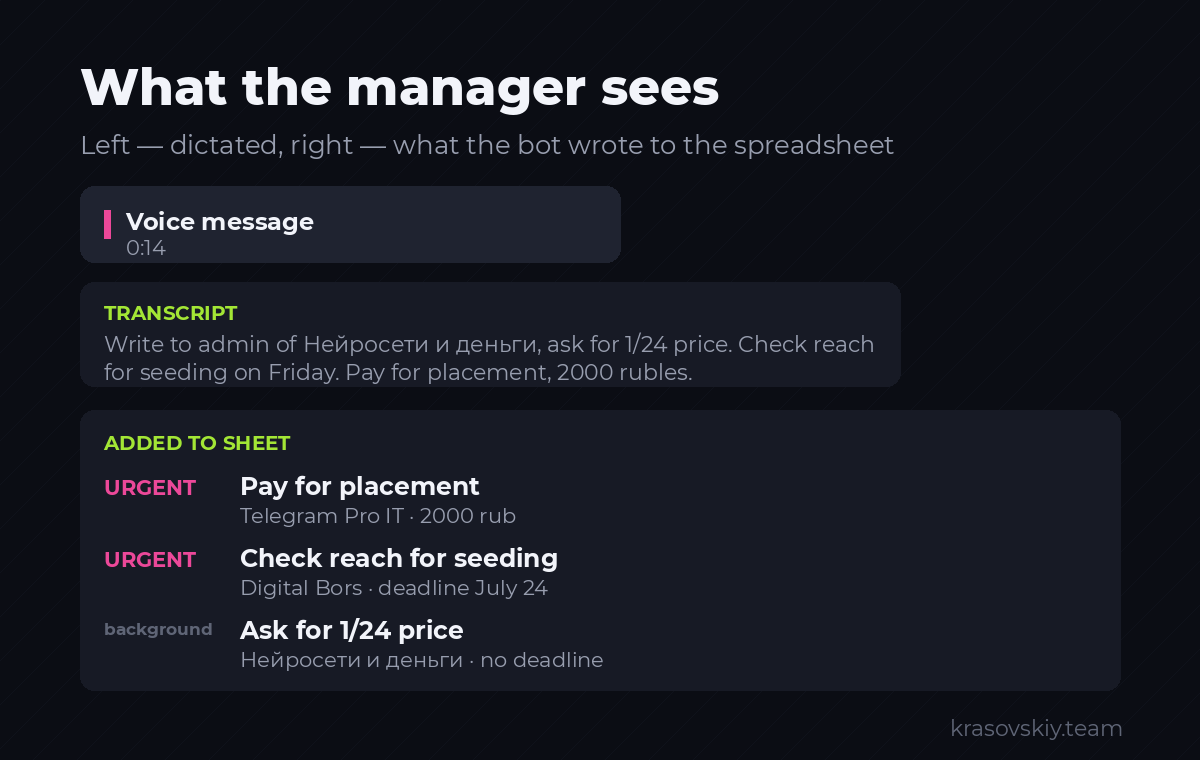
Step 10. Writing Tasks to a Spreadsheet
File sheets.py:
import datetime

import gspread
from google.oauth2.service_account import Credentials

import config

SCOPES = ["https://www.googleapis.com/auth/spreadsheets",
          "https://www.googleapis.com/auth/drive"]

_book = None


def book():
    global _book
    if _book is None:
        creds = Credentials.from_service_account_file(
            config.GOOGLE_CREDS, scopes=SCOPES)
        _book = gspread.authorize(creds).open(config.SHEET_NAME)
    return _book


def add_tasks(tasks: list) -> int:
    sheet = book().worksheet("Задачи")
    today = datetime.date.today().isoformat()
    rows = [[today,
             task.get("title", ""),
             task.get("type", "прочее"),
             task.get("channel") or "",
             task.get("due") or "",
             task.get("priority", 3),
             "новая",
             task.get("note", "")] for task in tasks]
    if rows:
        sheet.append_rows(rows, value_input_option="USER_ENTERED")
    return len(rows)


def tasks_for(date_iso: str) -> list:
    rows = book().worksheet("Задачи").get_all_records()
    return [row for row in rows
            if str(row.get("Срок", "")).startswith(date_iso)
            and row.get("Статус") != "готово"]


def placements() -> list:
    return book().worksheet("Размещения").get_all_records()
Connect to the bot. Replace the voice message handler with the full version:
import brain
import sheets

PRIORITY_MARK = {1: "СРОЧНО", 2: "обычный", 3: "фон"}


async def handle_text(message: Message, text: str):
    result = brain.parse_tasks(text)
    tasks = result.get("tasks", [])
    questions = result.get("questions", [])

    if tasks:
        sheets.add_tasks(tasks)
        lines = ["Записал в таблицу:", ""]
        for task in tasks:
            mark = PRIORITY_MARK.get(task.get("priority", 3), "фон")
            due = f", срок {task['due']}" if task.get("due") else ""
            channel = f" [{task['channel']}]" if task.get("channel") else ""
            lines.append(f"{mark}: {task['title']}{channel}{due}")
        await message.answer("n".join(lines))

    if questions:
        await message.answer("Уточните:n" + "n".join(f"- {q}" for q in questions))

    if not tasks and not questions:
        await message.answer("Задач не нашёл.")


@dp.message(F.voice)
async def on_voice(message: Message):
    if not allowed(message):
        return
    note = await message.answer("Слушаю...")
    file = await bot.get_file(message.voice.file_id)
    buffer = await bot.download_file(file.file_path)
    text = stt.transcribe(buffer.read())
    await note.edit_text(f"Расшифровка:nn{text}")
    await handle_text(message, text)


@dp.message(F.text & ~F.text.startswith("/"))
async def on_text(message: Message):
    if not allowed(message):
        return
    await handle_text(message, message.text)


@dp.message(Command("today"))
async def cmd_today(message: Message):
    if not allowed(message):
        return
    today = datetime.date.today().isoformat()
    rows = sheets.tasks_for(today)
    if not rows:
        await message.answer("На сегодня задач нет.")
        return
    lines = ["Задачи на сегодня:", ""]
    for row in sorted(rows, key=lambda r: r.get("Приоритет", 3)):
        lines.append(f"- {row['Задача']} [{row.get('Канал', '')}]")
    await message.answer("n".join(lines))
Add import datetime to the beginning of bot.py.
Step verification: Send a voice message with three tasks at once. The bot returns a transcription, then a list of tasks, and three new rows appear in the “Tasks” sheet of the spreadsheet.
Here’s a real model response to a voice message with three tasks—this is the result of live testing, not a hypothetical example:
{
  "tasks": [
    {"title": "Спросить цену на 1/24 и свободные слоты на следующую неделю",
     "type": "переговоры", "channel": "Нейросети и деньги",
     "due": null, "priority": 3, "note": "Формат: 1/24"},
    {"title": "Снять охват по вчерашнему посеву",
     "type": "замер_24ч", "channel": "DigitalBourse",
     "due": "2026-07-24", "priority": 1, "note": ""},
    {"title": "Оплатить размещение",
     "type": "оплата", "channel": "Telegram Pro IT",
     "due": null, "priority": 1, "note": "2000 рублей, кошелёк в закрепе"}
  ],
  "questions": []
}
Step 11. Reminders
The most valuable function. A missed measurement cannot be recovered.
File reminders.py:
import datetime

import sheets

MANAGER_CHAT = None  # подставляется при запуске


def _date(value: str):
    try:
        return datetime.date.fromisoformat(str(value)[:10])
    except ValueError:
        return None


def build_digest() -> str:
    today = datetime.date.today()
    out_today, need_24h, need_7d = [], [], []

    for row in sheets.placements():
        published = _date(row.get("Дата выхода"))
        if not published:
            continue
        channel = row.get("Канал", "без названия")

        if published == today and row.get("Статус") != "вышло":
            out_today.append(f"- {channel}: сегодня выход, проверить")

        if published + datetime.timedelta(1) == today and not row.get("Охват 24ч"):
            need_24h.append(f"- {channel}: снять охват за сутки")

        if published + datetime.timedelta(7) == today and not row.get("Подписчиков 7д"):
            need_7d.append(f"- {channel}: снять подписчиков по инвайт-ссылке")

    unpaid = [f"- {row.get('Канал')}: хеш {row.get('Хеш')}"
              for row in sheets.book().worksheet("Платежи").get_all_records()
              if str(row.get("Хеш отправлен", "")).strip().lower() in ("", "нет")]

    blocks = []
    if out_today:
        blocks.append("ВЫХОД СЕГОДНЯn" + "n".join(out_today))
    if need_24h:
        blocks.append("ЗАМЕР ЗА СУТКИn" + "n".join(need_24h))
    if need_7d:
        blocks.append("ЗАМЕР ЗА НЕДЕЛЮn" + "n".join(need_7d))
    if unpaid:
        blocks.append("ХЕШИ НЕ ОТПРАВЛЕНЫ АДМИНАМn" + "n".join(unpaid))

    return "nn".join(blocks)
Connect the scheduler in bot.py:
from apscheduler.schedulers.asyncio import AsyncIOScheduler
import reminders


async def send_digest():
    text = reminders.build_digest()
    if not text:
        return
    for user_id in config.ALLOWED_IDS:
        try:
            await bot.send_message(user_id, "Сводка на сегодняnn" + text)
        except Exception as error:
            logging.warning("Не отправилось %s: %s", user_id, error)


async def main():
    scheduler = AsyncIOScheduler(timezone="Europe/Kyiv")
    scheduler.add_job(send_digest, "cron", hour=10, minute=0)
    scheduler.add_job(send_digest, "cron", hour=18, minute=0)
    scheduler.start()
    await dp.start_polling(bot)
Set your time zone. The summary is sent twice a day: in the morning—plans, in the evening—uncompleted tasks.
Step verification: Temporarily change the task time to the next minute, restart the bot, and wait. The summary should arrive. Then revert to the normal time.
Step 12. Channel Analysis Before Ad Placement
Regular bots cannot read other channels—Telegram does not grant bots access to channels where they are not admins. User-level access is required.
Obtain credentials:
- Open
my.telegram.organd log in with your phone number. - API development tools → Fill in the app name → Create application.
- Copy
api_idandapi_hashto.env.
Warning that cannot be ignored. This access works through your personal account. Reading public channels and calculating statistics is safe. Do not send messages to strangers with it. Mass messaging to unfamiliar users is a direct spam trigger: first, a restriction on messaging those not in your contacts, then a ban on the account along with all ad placement correspondence. Messages to admins are sent manually by a person. Always.
File channels.py:
import statistics

from telethon.sync import TelegramClient

import config


def analyze(username: str, limit: int = 50) -> dict:
    """Считает статистику публичного канала по последним постам."""
    with TelegramClient("assistant_session",
                        int(config.TG_API_ID), config.TG_API_HASH) as client:
        entity = client.get_entity(username)
        views, reactions, ad_posts = [], [], 0

        for post in client.iter_messages(entity, limit=limit):
            if post.views:
                views.append(post.views)
            count = 0
            if getattr(post, "reactions", None):
                count = sum(r.count for r in post.reactions.results)
            reactions.append(count)
            text = (post.text or "").lower()
            if any(word in text for word in ("реклама", "партнёр", "erid", "промокод")):
                ad_posts += 1

        subscribers = getattr(entity, "participants_count", 0) or 0

    if not views:
        return {"error": "Нет постов с просмотрами. Канал закрыт или пуст."}

    average = statistics.mean(views)
    spread = (statistics.pstdev(views) / average * 100) if average else 0
    engagement = (statistics.mean(reactions) / average * 100) if average else 0

    return {
        "название": getattr(entity, "title", username),
        "подписчиков": subscribers,
        "средний охват": round(average),
        "охват к подписчикам, %": round(average / subscribers * 100, 1) if subscribers else 0,
        "ER, %": round(engagement, 2),
        "разброс просмотров, %": round(spread, 1),
        "рекламных постов из выборки": ad_posts,
    }


def verdict(stats: dict) -> list:
    """Красные флаги. Считаются по правилам регламента."""
    flags = []
    if stats.get("ER, %", 0) < 1:
        flags.append("ER ниже 1 процента — аудитория мёртвая или накрученная")
    if stats.get("охват к подписчикам, %", 0) < 10:
        flags.append("Охват меньше 10 процентов от подписчиков — канал выгорел")
    if stats.get("разброс просмотров, %", 100) < 8:
        flags.append("Просмотры у всех постов почти одинаковые — признак накрутки")
    if stats.get("рекламных постов из выборки", 0) > 15:
        flags.append("Слишком много рекламы — наш пост утонет")
    return flags
About view count variance: A live channel has posts that perform well and others that don’t, with significant variance. If all posts have nearly identical views, they are being artificially inflated by bots to the same value. This is the most reliable indicator, harder to fake than reach itself.
Command in bot.py:
import channels


@dp.message(Command("channel"))
async def cmd_channel(message: Message):
    if not allowed(message):
        return
    parts = message.text.split(maxsplit=1)
    if len(parts) < 2:
        await message.answer("Формат: /channel @username")
        return

    await message.answer("Считаю...")
    stats = channels.analyze(parts[1].strip())
    if "error" in stats:
        await message.answer(stats["error"])
        return

    lines = [f"{key}: {value}" for key, value in stats.items()]
    flags = channels.verdict(stats)
    if flags:
        lines += ["", "КРАСНЫЕ ФЛАГИ:"] + [f"- {flag}" for flag in flags]
    else:
        lines += ["", "Явных признаков накрутки нет."]
    await message.answer("n".join(lines))
First launch requires login. Telethon will ask for your phone number and a code from Telegram—once, directly in the server console. Afterward, a file assistant_session.session will appear, and login will no longer be required. This file is equivalent to account access; it must not be copied or shared.
Step 13. Drafting an Ad Post
Add to prompts.py:
DRAFT_SYSTEM = """Ты пишешь рекламный пост для размещения в чужом Telegram-канале. Отвечаешь только текстом поста, без пояснений и без markdown.

Требования:
1. Первая строка — крючок под аудиторию именно этого канала, а не общий.
2. Дальше два-четыре предложения по сути: что человек получит.
3. Одно конкретное доказательство: цифра, срок или результат. Не выдумывай цифры, бери только из брифа. Если цифр в брифе нет — обойдись без них.
4. Призыв к действию и ссылка. Ссылка ровно одна, вставь её как есть.
5. Объём — до 700 знаков. Пост должен читаться с телефона без раскрытия.
6. Подстройся под манеру канала из примеров ниже: длина фраз, обращение на ты или на вы, наличие заголовков. Не копируй их темы, копируй интонацию.
7. Без эмодзи. Без канцелярита. Без обещаний, которых нет в брифе."""


DRAFT_USER = """Бриф продукта:
{brief}

Ссылка: {link}

Примеры постов канала, под который пишем:
{samples}"""
In brain.py:
def draft_ad(brief: str, link: str, samples: list) -> str:
    joined = "nn---nn".join(samples[:5])
    user = prompts.DRAFT_USER.format(brief=brief, link=link, samples=joined)
    return ask(prompts.DRAFT_SYSTEM, user, json_mode=False)
In channels.py—a function for post examples:
def samples(username: str, limit: int = 10) -> list:
    with TelegramClient("assistant_session",
                        int(config.TG_API_ID), config.TG_API_HASH) as client:
        return [post.text for post in client.iter_messages(username, limit=limit)
                if post.text and len(post.text) > 120]
The command works in two steps. In bot.py:
from aiogram.fsm.context import FSMContext
from aiogram.fsm.state import State, StatesGroup


class Draft(StatesGroup):
    waiting = State()


@dp.message(Command("draft"))
async def cmd_draft(message: Message, state: FSMContext):
    if not allowed(message):
        return
    await state.set_state(Draft.waiting)
    await message.answer(
        "Пришлите одной строкой: @канал | бриф продукта | ссылкаnn"
        "Пример:n@ai_channel | сервис делает 3D-модели из фото | https://example.com"
    )


@dp.message(Draft.waiting)
async def do_draft(message: Message, state: FSMContext):
    await state.clear()
    parts = [p.strip() for p in message.text.split("|")]
    if len(parts) < 3:
        await message.answer("Нужно три части через | ")
        return

    channel, brief, link = parts[0], parts[1], parts[2]
    await message.answer("Читаю канал и пишу черновик...")
    samples = channels.samples(channel)
    text = brain.draft_ad(brief, link, samples)
    await message.answer("Черновик. Проверьте факты перед отправкой админу:nn" + text)
The state dispatcher requires storage. Modify the dispatcher creation at the start of the file:
from aiogram.fsm.storage.memory import MemoryStorage
dp = Dispatcher(storage=MemoryStorage())
This is a draft. The model may write well but distort facts. A human must review the text before sending it to the admin. This is not overcaution: a number not in the brief appearing in the ad means a complaint against you, not the bot.
Step 14. Publishing to Your Channel
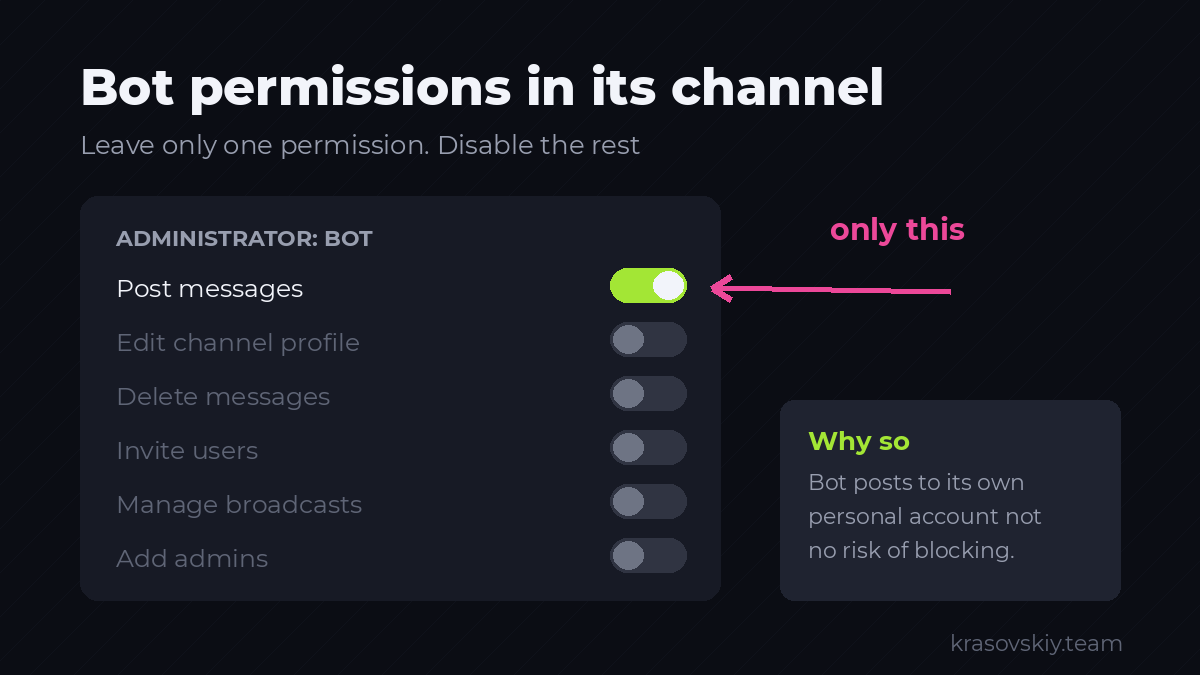
Everything here is safe: the bot publishes to a channel where it is an administrator. The personal account is not involved, and there is no risk of being blocked.
- Open your channel → Manage → Administrators → Add administrator.
- Find the bot by username and add it.
- Leave only the Post messages permission enabled; disable the rest.
- In
.env, setCHANNEL_IDto@channel_name(for public) or a numeric ID like-100...(for private).
@dp.message(Command("post"))
async def cmd_post(message: Message):
    if not allowed(message):
        return
    text = message.text.split(maxsplit=1)
    if len(text) < 2:
        await message.answer("Формат: /post текст поста")
        return
    await bot.send_message(config.CHANNEL_ID, text[1])
    await message.answer("Опубликовано.")
If you receive a chat not found error—the bot is not added to the channel or the username is incorrect. not enough rights—the “Post messages” permission was not granted.
Step 15. Autostart and Logs
While the bot is launched manually, it will die when the SSH session is closed. Let’s set it to autostart.
Switch to root (exit from the assistant user) and create a service file:
nano /etc/systemd/system/tg-assistant.service[Unit]
Description=Telegram assistant
After=network-online.target
[Service]
Type=simple
User=assistant
WorkingDirectory=/home/assistant/tg-assistant
ExecStart=/home/assistant/tg-assistant/venv/bin/python bot.py
Restart=always
RestartSec=10
[Install]
WantedBy=multi-user.targetEnable it:
systemctl daemon-reload
systemctl enable --now tg-assistant
systemctl status tg-assistant
The status should show active (running).
Useful daily commands:
journalctl -u tg-assistant -f          # смотреть логи вживую
systemctl restart tg-assistant          # перезапустить после правок
journalctl -u tg-assistant --since today | grep -i error   # ошибки за сегодня
Restart=always means the bot will restart automatically after a crash or server reboot.
Part 4. Final Check
Go through the checklist. Each item must work.
/start— a welcome message is received.- Voice message with three tasks — transcription arrives, followed by three tasks, and three new rows appear in the sheet.
- Text message “pay for placement in channel X, 2000” — a task with type “payment” and first priority is created.
- Vague phrase without specifics — the bot asks for clarification and does not create tasks.
/today— shows tasks for today./channel @any_public_channel— statistics and red flags are received./draft @channel | brief | link— a draft in the channel’s style is received./post test— the message appears in your channel.systemctl restart tg-assistant— the bot responds and works after restart.- Fill in the “Placements” sheet with a row dated yesterday, call the summary — a reminder to check reach is received.
If all ten pass — the assistant is assembled.
Part 5. Common Errors
| Symptom | Cause | What to Do |
|---|---|---|
| Bot is silent, logs are empty | Hosting blocks api.telegram.org | Check Step 3, change server |
Unauthorized on startup | Invalid or revoked token | Get a new one from BotFather via /revoke |
SpreadsheetNotFound | Service account lacks access to the sheet | Step 5, item 6 |
WorksheetNotFound | Sheet name mismatch | Verify letter by letter, including case |
| Tasks with wrong dates | Model calculates dates itself | Ensure the calendar is included in the prompt |
| Channel name is truncated | Example for rule 3 was removed from the prompt | Restore the example |
| Bot invents tasks | Rule 8 was removed | Restore the rule |
FloodWait from Telethon | Too frequent channel analysis | Wait the specified time, add delays between requests |
| Bot replies “No access” | ID not in ALLOWED_IDS | Add ID and restart the service |
| Bot disappears after reboot | Autostart not enabled | systemctl enable --now tg-assistant |
Part 6. Case Study: A Similar System in Action
Everything described above is not theory. We have a system of the same architecture in operation, only focused on content rather than ad buying. It’s useful here because it shows what breaks over time.
What it consists of:
- Channel reader. The same Telethon from Step 12. Collects posts from target public channels to see which topics are currently being discussed and what competitors have already covered.
- Topic queue. Stored in a database, not in someone’s head. Each topic has a status: pending, in progress, published.
- Text generator. The same principle as in Step 13: a prompt with tone rules and restrictions, producing a draft.
- Duplicate check before generation. Each finished material is converted into a numerical fingerprint and stored in a separate database. Before writing new text, the system compares the topic with already written ones. If a match is found, the topic is not taken into work.
- Scheduled bot publishing — exactly as in Step 14.
Three things that had to be fixed in production. Implement them upfront.
- Publication time limits turned out to be more important than text quality. Initially, the bot published when the material was ready — sometimes at night or with two posts in a row. From the outside, this looked like a spam feed, regardless of the content. Now there’s a strict window: no earlier than 9 AM, no later than 10 PM, with a minimum of four and a half hours between posts. If the slot doesn’t fit, publication is postponed, not canceled.
- Without duplicate checks, the generator goes in circles. After several dozen materials, it starts writing about the same thing in different words. This is discovered late and takes a long time to clean up. The similarity check must be implemented before volume accumulates — retrofitting it later is more painful.
- Human review is mandatory. Everything published under our name is reviewed by a person. This is especially true for things that can’t be checked visually: for example, voiceovers for videos are listened to before publication because speech synthesis regularly breaks the pronunciation of terms and numbers — the same issue as
1.24in Step 8, but in reverse.
What the system fundamentally does not do: it does not write to unfamiliar people from a personal account. This is not a technical limitation but a deliberate choice, for the reasons outlined in Step 12.
Part 7. What’s Next
The assistant is assembled but currently only accepts tasks and performs calculations. Next, it is expanded to fit the workflow:
- Autofill reach metrics. The bot automatically reads the published post via the link from the table and records views after 24 hours—no manual input required.
- CPM and CPS calculations. Formulas are set in the table; the bot sends a weekly summary with verdicts for each channel.
- Message drafts for admins. The bot inserts the channel name, price, and the required template from the guidelines, then saves the ready text. A human sends it.
- Hash control. A separate command displays a list of unsent hashes in a single message.
The expansion order is determined by what is most frequently lost in the workflow. Start with autofilling reach metrics—it’s the most routine and most forgotten operation.
Appendix. All Prompts in One List
Prompts are moved to prompts.py so they can be edited without modifying the code. Changing them is normal, but after each edit, run the verification from Part 4, steps 2-4: a prompt can easily be ruined by a single phrasing.
TASKS_SYSTEM— parsing dictated input into tasks. Step 9.date_table— not a prompt, but a substituted calendar. Without it, dates will be incorrect.DRAFT_SYSTEMandDRAFT_USER— draft of an advertising post. Step 13.

Andrey Krasovskiy is a programmer and data scientist experienced in building complex automated systems with Python, Google Colab and n8n. His expertise spans SEO ecosystems, API integrations (Ahrefs, Google Ads, Search Console) and content pipelines. Andrey combines technical precision with an entrepreneurial mindset to build solutions that deliver real results.